;'%3e%3cpath%20fill='%23ff0068'%20d='M493.4%2024.6l-104-24c-11.3-2.6-22.9%203.3-27.5%2013.9l-48%20112c-4.2%209.8-1.4%2021.3%206.9%2028l60.6%2049.6c-36%2076.7-98.9%20140.5-177.2%20177.2l-49.6-60.6c-6.8-8.3-18.2-11.1-28-6.9l-112%2048C3.9%20366.5-2%20378.1.6%20389.4l24%20104C27.1%20504.2%2036.7%20512%2048%20512c256.1%200%20464-207.5%20464-464%200-11.2-7.7-20.9-18.6-23.4z'%3e%3c/path%3e%3c/svg%3e) Call requests
Call requests
Contacts
Track the journey of every customer in one organized view
Check the contact creation, the conversations started and the changes made by the team to serve with more context and follow the operation with more control.
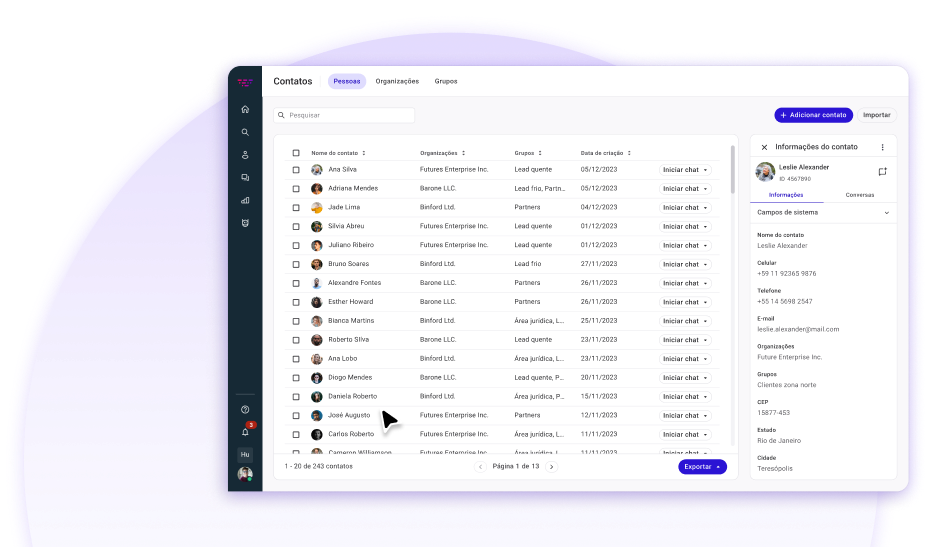

An organized view to manage every contact
The Contacts brings together data, conversations and records so your team can follow each customer with more context.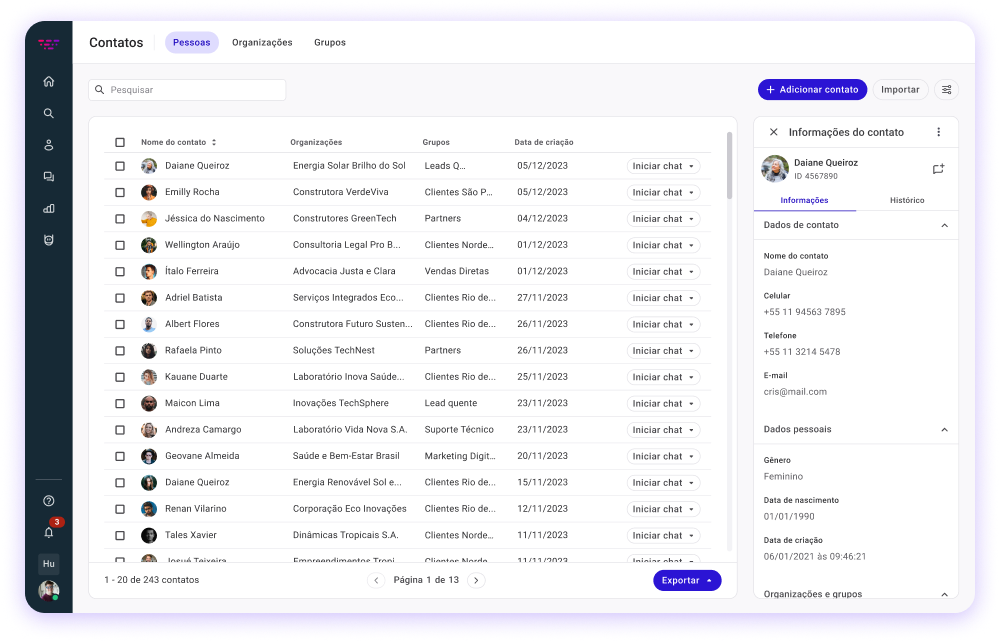
Contact table and side panel
Check every contact without losing sight of your base
View your contact list and check each customer’s data in the side panel, without leaving the main screen.
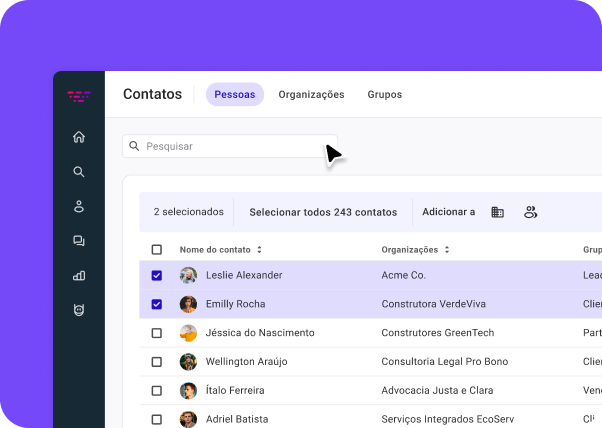
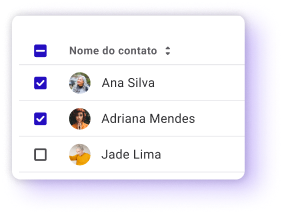
Find contacts in seconds with the optimized search and perform bulk actions easily

Contact profile
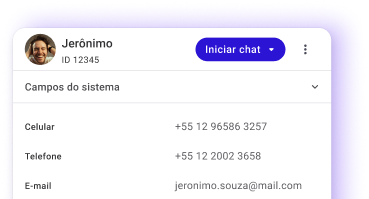
Every customer in one centralized and organized view
- Centralized data
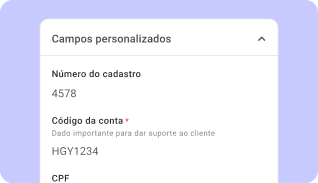
Records and custom fields gathered in the same place.
- Dedicated Notes tab
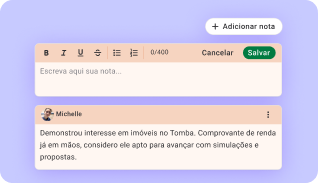
Record important observations and messages about the customer clearly and visible to the whole team.
- Files tab
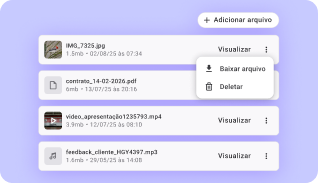
Keep relevant documents and contracts linked directly to the customer profile (available for paid accounts)
Contact history
Understand what happened at every stage of the journey
Follow when the contact was created, the conversations started and the changes made by the team, with author, date and time identification.
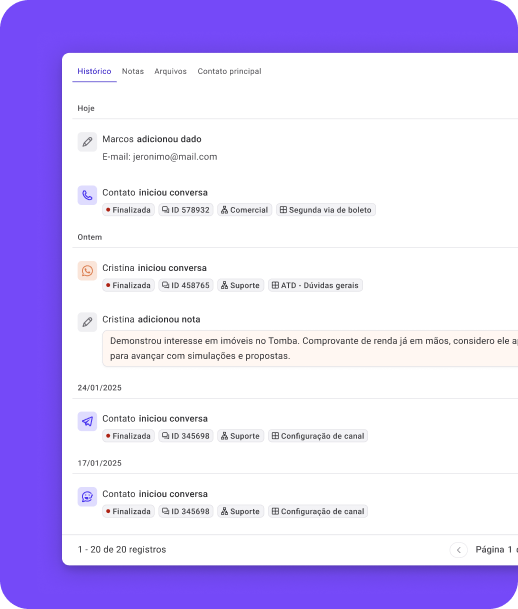
- Context for agentsKnow who started the chat and which previous interactions happened before sending the first message.
- Traceability for managersSee who created the contact, who edited data and when each change was made.
- Date and time recordsFollow the customer timeline with detailed date and time (timestamps).


'%3e%3cpath%20d='M20.0026%2029.1693C25.0652%2029.1693%2029.1693%2025.0652%2029.1693%2020.0026C29.1693%2014.94%2025.0652%2010.8359%2020.0026%2010.8359C14.94%2010.8359%2010.8359%2014.94%2010.8359%2020.0026C10.8359%2025.0652%2014.94%2029.1693%2020.0026%2029.1693Z'%20stroke='white'%20stroke-width='1.83333'%20stroke-linecap='round'%20stroke-linejoin='round'/%3e%3cpath%20d='M20%2014.5V20L23.6667%2021.8333'%20stroke='white'%20stroke-width='1.83333'%20stroke-linecap='round'%20stroke-linejoin='round'/%3e%3c/g%3e%3cdefs%3e%3cclipPath%20id='clip0_13955_97570'%3e%3crect%20width='22'%20height='22'%20fill='white'%20transform='translate(9%209)'/%3e%3c/clipPath%3e%3c/defs%3e%3c/svg%3e)
Import and export contacts according to your operation
Add CSV files with up to 150,000 rows in a single operation or export your whole base and only the selected contacts.

ImportContacts in
- Up to 150,000 rows at once
- Fast, simplified import for large operations
'%3e%3cpath%20d='M8.0026%2012.1693C10.3038%2012.1693%2012.1693%2010.3038%2012.1693%208.0026C12.1693%205.70142%2010.3038%203.83594%208.0026%203.83594C5.70142%203.83594%203.83594%205.70142%203.83594%208.0026C3.83594%2010.3038%205.70142%2012.1693%208.0026%2012.1693Z'%20stroke='%237549F8'%20stroke-width='0.833333'%20stroke-linecap='round'%20stroke-linejoin='round'/%3e%3cpath%20d='M6.75%207.9974L7.58333%208.83073L9.25%207.16406'%20stroke='%237549F8'%20stroke-width='0.833333'%20stroke-linecap='round'%20stroke-linejoin='round'/%3e%3c/g%3e%3cdefs%3e%3cclipPath%20id='clip0_13955_97682'%3e%3crect%20width='10'%20height='10'%20fill='white'%20transform='translate(3%203)'/%3e%3c/clipPath%3e%3c/defs%3e%3c/svg%3e)
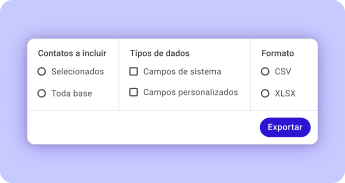

ExportContacts out
- Export selected contacts or the entire base
- Choose the data type and format for the exported file

Groups and organizations
Organize your base with Groups and Organizations
Beyond the history and the individual profiles, you count on Groups and Organizations to categorize your base.
Assign contacts to specific companies or segments in a simple way and keep your operation organized by sectors or client portfolios.
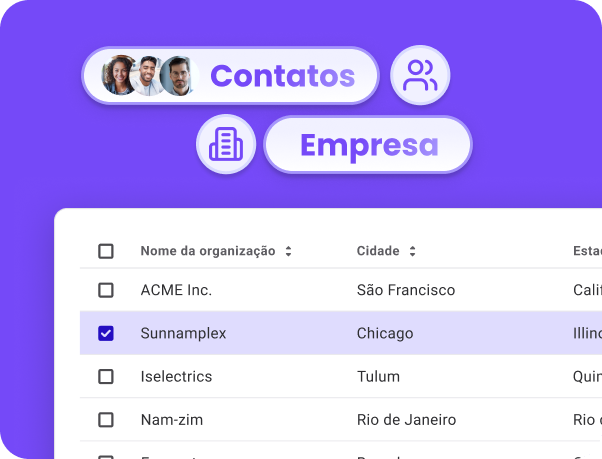
- Custom groups
- Organizations

'%3e%3cpath%20d='M3.5%2012.8307V2.33073C3.5%202.02131%203.62292%201.72456%203.84171%201.50577C4.0605%201.28698%204.35725%201.16406%204.66667%201.16406H9.33333C9.64275%201.16406%209.9395%201.28698%2010.1583%201.50577C10.3771%201.72456%2010.5%202.02131%2010.5%202.33073V12.8307H3.5Z'%20stroke='%237549F8'%20stroke-width='1.16667'%20stroke-linecap='round'%20stroke-linejoin='round'/%3e%3cpath%20d='M3.4974%207H2.33073C2.02131%207%201.72456%207.12292%201.50577%207.34171C1.28698%207.5605%201.16406%207.85725%201.16406%208.16667V11.6667C1.16406%2011.9761%201.28698%2012.2728%201.50577%2012.4916C1.72456%2012.7104%202.02131%2012.8333%202.33073%2012.8333H3.4974'%20stroke='%237549F8'%20stroke-width='1.16667'%20stroke-linecap='round'%20stroke-linejoin='round'/%3e%3cpath%20d='M10.5%205.25H11.6667C11.9761%205.25%2012.2728%205.37292%2012.4916%205.59171C12.7104%205.8105%2012.8333%206.10725%2012.8333%206.41667V11.6667C12.8333%2011.9761%2012.7104%2012.2728%2012.4916%2012.4916C12.2728%2012.7104%2011.9761%2012.8333%2011.6667%2012.8333H10.5'%20stroke='%237549F8'%20stroke-width='1.16667'%20stroke-linecap='round'%20stroke-linejoin='round'/%3e%3cpath%20d='M5.83594%203.5H8.16927'%20stroke='%237549F8'%20stroke-width='1.16667'%20stroke-linecap='round'%20stroke-linejoin='round'/%3e%3cpath%20d='M5.83594%205.83594H8.16927'%20stroke='%237549F8'%20stroke-width='1.16667'%20stroke-linecap='round'%20stroke-linejoin='round'/%3e%3cpath%20d='M5.83594%208.16406H8.16927'%20stroke='%237549F8'%20stroke-width='1.16667'%20stroke-linecap='round'%20stroke-linejoin='round'/%3e%3cpath%20d='M5.83594%2010.5H8.16927'%20stroke='%237549F8'%20stroke-width='1.16667'%20stroke-linecap='round'%20stroke-linejoin='round'/%3e%3c/g%3e%3cdefs%3e%3cclipPath%20id='clip0_13955_97105'%3e%3crect%20width='14'%20height='14'%20fill='white'/%3e%3c/clipPath%3e%3c/defs%3e%3c/svg%3e)
Access data and history to support with more context and follow your team's changes
For agents
Fast, contextualized and human support'%3e%3cpath%20d='M4.55116%207.10168C4.51024%206.94306%204.42756%206.79831%204.31173%206.68248C4.1959%206.56665%204.05115%206.48397%203.89253%206.44305L1.08066%205.71797C1.03268%205.70435%200.990459%205.67546%200.960394%205.63567C0.930329%205.59589%200.914062%205.54738%200.914062%205.49751C0.914062%205.44764%200.930329%205.39913%200.960394%205.35935C0.990459%205.31956%201.03268%205.29067%201.08066%205.27705L3.89253%204.55151C4.05109%204.51063%204.19581%204.42802%204.31163%204.31228C4.42746%204.19653%204.51016%204.05188%204.55116%203.89334L5.27624%201.08147C5.28972%201.03331%205.31858%200.990875%205.35843%200.960649C5.39827%200.930423%205.44691%200.914062%205.49693%200.914062C5.54694%200.914062%205.59558%200.930423%205.63542%200.960649C5.67527%200.990875%205.70414%201.03331%205.71761%201.08147L6.44224%203.89334C6.48316%204.05196%206.56583%204.19671%206.68166%204.31254C6.79749%204.42837%206.94225%204.51105%207.10086%204.55197L9.91274%205.27659C9.96109%205.28993%2010.0037%205.31876%2010.0341%205.35867C10.0645%205.39858%2010.081%205.44735%2010.081%205.49751C10.081%205.54767%2010.0645%205.59644%2010.0341%205.63635C10.0037%205.67626%209.96109%205.70509%209.91274%205.71843L7.10086%206.44305C6.94225%206.48397%206.79749%206.56665%206.68166%206.68248C6.56583%206.79831%206.48316%206.94306%206.44224%207.10168L5.71716%209.91355C5.70368%209.96171%205.67481%2010.0041%205.63497%2010.0344C5.59512%2010.0646%205.54648%2010.081%205.49647%2010.081C5.44646%2010.081%205.39782%2010.0646%205.35797%2010.0344C5.31812%2010.0041%205.28926%209.96171%205.27578%209.91355L4.55116%207.10168Z'%20stroke='%237549F8'%20stroke-width='0.916667'%20stroke-linecap='round'%20stroke-linejoin='round'/%3e%3cpath%20d='M9.16406%201.375V3.20833'%20stroke='%237549F8'%20stroke-width='0.916667'%20stroke-linecap='round'%20stroke-linejoin='round'/%3e%3cpath%20d='M10.0833%202.28906H8.25'%20stroke='%237549F8'%20stroke-width='0.916667'%20stroke-linecap='round'%20stroke-linejoin='round'/%3e%3cpath%20d='M1.83594%207.78906V8.70573'%20stroke='%237549F8'%20stroke-width='0.916667'%20stroke-linecap='round'%20stroke-linejoin='round'/%3e%3cpath%20d='M2.29167%208.25H1.375'%20stroke='%237549F8'%20stroke-width='0.916667'%20stroke-linecap='round'%20stroke-linejoin='round'/%3e%3c/g%3e%3cdefs%3e%3cclipPath%20id='clip0_13955_97914'%3e%3crect%20width='11'%20height='11'%20fill='white'/%3e%3c/clipPath%3e%3c/defs%3e%3c/svg%3e)
- Find customer data in just a few seconds, without wasting time navigating complex screens.
- Check the customer notes and history before replying, ensuring a personalized conversation.
- Change their information in the side panel without having to close the current conversation screen.


For managers
Visibility, governance and control of the operation'%3e%3cpath%20d='M4.55116%207.10168C4.51024%206.94306%204.42756%206.79831%204.31173%206.68248C4.1959%206.56665%204.05115%206.48397%203.89253%206.44305L1.08066%205.71797C1.03268%205.70435%200.990459%205.67546%200.960394%205.63567C0.930329%205.59589%200.914062%205.54738%200.914062%205.49751C0.914062%205.44764%200.930329%205.39913%200.960394%205.35935C0.990459%205.31956%201.03268%205.29067%201.08066%205.27705L3.89253%204.55151C4.05109%204.51063%204.19581%204.42802%204.31163%204.31228C4.42746%204.19653%204.51016%204.05188%204.55116%203.89334L5.27624%201.08147C5.28972%201.03331%205.31858%200.990875%205.35843%200.960649C5.39827%200.930423%205.44691%200.914062%205.49693%200.914062C5.54694%200.914062%205.59558%200.930423%205.63542%200.960649C5.67527%200.990875%205.70414%201.03331%205.71761%201.08147L6.44224%203.89334C6.48316%204.05196%206.56583%204.19671%206.68166%204.31254C6.79749%204.42837%206.94225%204.51105%207.10086%204.55197L9.91274%205.27659C9.96109%205.28993%2010.0037%205.31876%2010.0341%205.35867C10.0645%205.39858%2010.081%205.44735%2010.081%205.49751C10.081%205.54767%2010.0645%205.59644%2010.0341%205.63635C10.0037%205.67626%209.96109%205.70509%209.91274%205.71843L7.10086%206.44305C6.94225%206.48397%206.79749%206.56665%206.68166%206.68248C6.56583%206.79831%206.48316%206.94306%206.44224%207.10168L5.71716%209.91355C5.70368%209.96171%205.67481%2010.0041%205.63497%2010.0344C5.59512%2010.0646%205.54648%2010.081%205.49647%2010.081C5.44646%2010.081%205.39782%2010.0646%205.35797%2010.0344C5.31812%2010.0041%205.28926%209.96171%205.27578%209.91355L4.55116%207.10168Z'%20stroke='%23FF0068'%20stroke-width='0.916667'%20stroke-linecap='round'%20stroke-linejoin='round'/%3e%3cpath%20d='M9.16406%201.375V3.20833'%20stroke='%23FF0068'%20stroke-width='0.916667'%20stroke-linecap='round'%20stroke-linejoin='round'/%3e%3cpath%20d='M10.0833%202.28906H8.25'%20stroke='%23FF0068'%20stroke-width='0.916667'%20stroke-linecap='round'%20stroke-linejoin='round'/%3e%3cpath%20d='M1.83594%207.78906V8.70573'%20stroke='%23FF0068'%20stroke-width='0.916667'%20stroke-linecap='round'%20stroke-linejoin='round'/%3e%3cpath%20d='M2.29167%208.25H1.375'%20stroke='%23FF0068'%20stroke-width='0.916667'%20stroke-linecap='round'%20stroke-linejoin='round'/%3e%3c/g%3e%3cdefs%3e%3cclipPath%20id='clip0_13955_97950'%3e%3crect%20width='11'%20height='11'%20fill='white'/%3e%3c/clipPath%3e%3c/defs%3e%3c/svg%3e)
- Know clearly which team member created or edited data in the base and when the action happened.
- Upload and manage files with up to 150,000 rows easily and quickly.
- Ensure registration standards and keep the history preserved as the team grows.


Trust your operation to who delivers tangible results
Companies of all sizes choose Huggy to organize and boost their digital customer service.


'/%3e%3cdefs%3e%3clinearGradient%20id='paint0_linear'%20x1='8.18676'%20y1='5.58962'%20x2='52.4792'%20y2='5.58962'%20gradientUnits='userSpaceOnUse'%3e%3cstop%20stop-color='%23FF0068'/%3e%3cstop%20offset='1'%20stop-color='%237549F8'/%3e%3c/linearGradient%3e%3c/defs%3e%3c/svg%3e)
Trust your operation to those who deliver real results
Join more than 4,000 companies around the world that chose Huggy's intelligence, efficiency and technology to turn interactions into growth.